
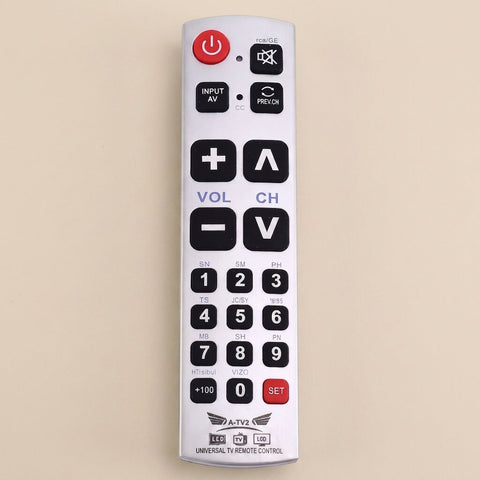
Big Button Universal TV Remote
The Samsung TV works immediately without any additional settings, but You need to set the brand number as instructed in the manual to eliminate input delay. I immediately inserted the battery and tested it, but there was an input delay.
1. Choose Your Set
Multi-packs are discounted automatically in your cart. Your cart total is the final price.
There are three remotes on the table and one of them works the television. Somebody picks up the wrong one, presses something, and the picture goes. This is the one that stays on the arm of the chair, so the evening stops being a guessing game and nobody has to call across the room for help.
Why Choose DailyEase
Twelve buttons, and you use all of them
Buttons You Find Without Looking
Power, volume, channel and mute stand proud of the surface and sit far enough apart that your thumb never catches two.
INPUT Is On The Front
The button that brings the picture back when the screen has wandered off. Labeled on the face, not buried in a menu.
Nothing To Set Up On Most TVs
Batteries in, point, press. Buyers report Samsung, LG and TCL sets answering straight away, with one code for the rest.
Nothing On It You Did Not Ask For
No voice key to hit by accident and no colored shortcuts into an app store. Six jobs, twelve buttons, and it stops there.
Made For You
Made For Homes Like Yours
Most houses need more than one. Start with the room where the pile is worst, or sort the whole house at once.
The Chair In The Living Room
The one that lives on the arm and gets used every evening. Nobody in the house has to ask which remote it is.
The Bedroom Set
A second one upstairs, so the good remote stops walking up at nine o'clock and never coming back down again.
A Living Room You Visit
You are buying this for somebody else. Two AAA batteries in, point at the TV, and on most sets that is the setup.
The TV That Got Clever
New set, new handset, forty buttons and half of them for services nobody here subscribes to. This one goes back to basics.
Real Results
What Our Customers Say
"The Samsung TV works immediately without any additional settings, but You need to set the brand number as instructed in the manual to eliminate input delay. I immediately inserted the battery and tested it, but there was an input delay."
"With a Samsung TV it works as is, without needing to program anything. It comes with a paper with codes for all the brands."
"Great product and works instantly with tv recommend and will be buying more for family"
How It Works
Working in under a minute on most TVs

Put In Two AAA Batteries
The door slides off the back. Batteries are not in the box, so have a pair on the table before you start.

Point At The TV And Press Power
Most sets answer immediately. No pairing, no app, no wifi. If the picture comes on, you are already finished.

If Not, One Four Digit Code
Find your brand on the printed sheet, hold SET, type the digits. Buyers report an old Sony Bravia taking the first code.
What You Get
A plain remote, built plainly
Twelve Keys Plus A Number Pad
Power, mute, INPUT AV, PREV.CH, volume, channel, 0 to 9, +100 and SET. That is the entire remote, and that is the point.
Plain Infrared, Like The Old One
Line of sight infrared with a stated range over 26 feet. It talks to the television, not to your wifi, so there is no account.
Brand Codes Printed On The Face
Common brand shortcuts sit above the number keys for a one press setup, and a full code sheet comes in the box.
One Piece Shell, Raised Keys
A solid ABS body with keys that stand clear of the surface, so a thumb finds the edge of a button before it presses it.
See The Difference
Why Choose This TV Remote?
The Details
Honest specifications
Questions
The things people actually ask
Many sets answer with no setup: batteries in, point, press. Samsung, LG, TCL and Sony all appear in buyer reports. The rest take one code from the printed sheet, about thirty seconds. Send us your model and we will check.
Usually not, and when you do it is one step rather than a procedure: hold SET, type the four digits printed beside your brand, release. Buyers report an old Sony Bravia and a TCL both working on the first code.
That happens when the brand code has not been entered, because the remote is still working out which set it is talking to. Type the four digits for your brand and the lag goes. Buyers who did that report it turning instant.
No, it takes two AAA alkaline batteries and they are not in the box. Have a pair on the table before you open the parcel, so the first minute goes the way it should instead of turning into a trip to the store.
It runs the television itself: power, volume, channel, mute and input. If a box or a soundbar is in the mix, keep its handset in a drawer for the occasional setting and let this one handle the everyday.
Tell us and we will replace it or refund you. A small number have arrived dead, usually with the light stuck on and no key responding. Try a fresh pair of batteries first, then message us and we will sort it out.
Not sure it covers the TV you have in mind?
Send us the make and model before you order. A real person will look it up and tell you honestly whether this remote handles it.
Contact DailyEaseOne for the living room, one for the bedroom.
Bundle savings apply automatically in the cart. Free US shipping available.
Add to CartCustomers Also Bought
-
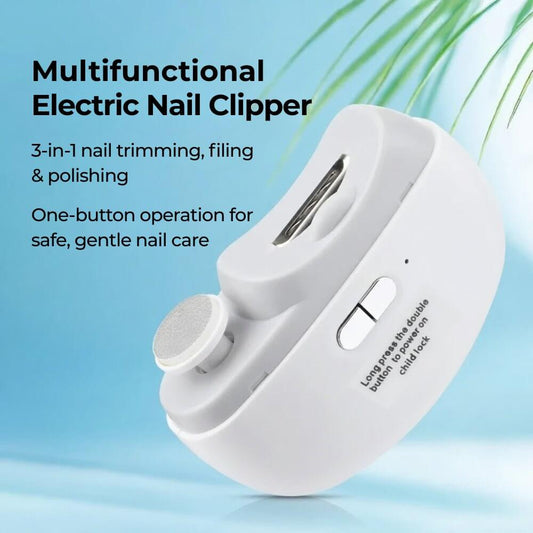
3-in-1 Electric Nail Trimmer
Regular price $24.99 USDRegular price$34.99 USDSale price $24.99 USDSale -
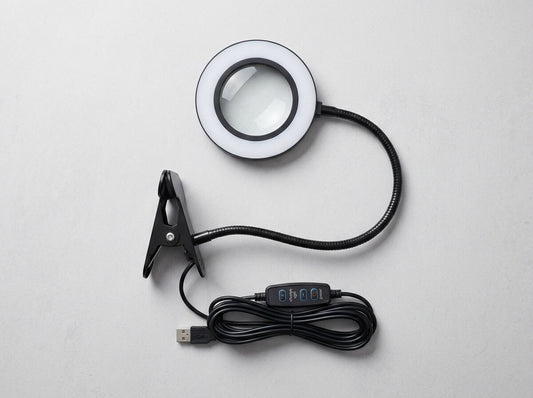
Magnifying Glass with Light
Regular price $39.99 USDRegular price$59.99 USDSale price $39.99 USDSale -
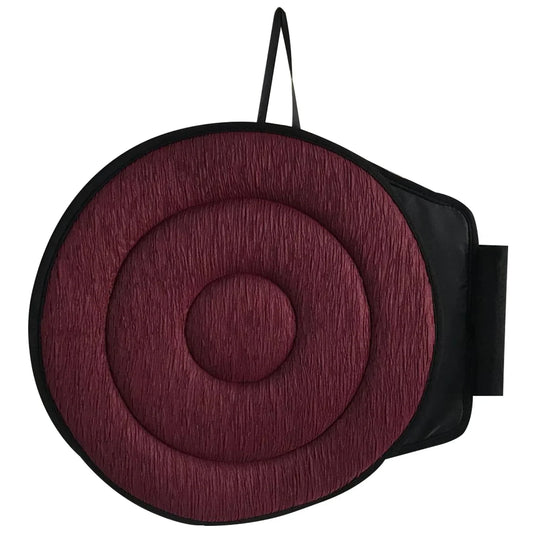
360° Rotating Seat Cushion
Regular price $39.99 USDRegular price$59.99 USDSale price $39.99 USDSale -

 Sale
Sale




Built for Better Days
Daily Ease was born from a simple belief: everyone deserves products that make daily life more comfortable, without the complexity.

It started with a simple question.
While helping my parents navigate their daily lives, I kept running into the same frustration: why is it so hard to find quality products that actually work, without being complicated or overpriced?
My mother didn't need a gadget with 20 buttons. She needed something simple that would make her day a little easier. Something reliable. Something I'd feel good giving her.
That's why Daily Ease exists. We curate everyday comfort products that we'd proudly recommend to our own families. No gimmicks. No empty promises. Just thoughtfully chosen items that deliver real comfort, every single day.